
PrintMaster Scans · Windows
A home for your scans.
Without the setup headache.
Create a dedicated account, scan folder, SMB share, and desktop shortcut, with guided network configuration.
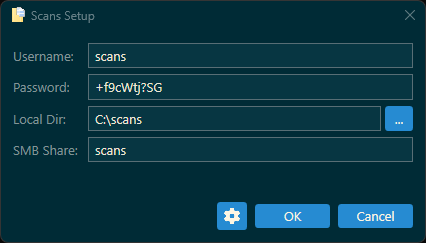
Provided by PrintMaster. Example credentials shown.
Get started
Less configuration.
More getting things done.
Prepare the receiving PC first. Then add its share address and scan-account credentials to your printer.
Full setup and troubleshooting guidePrefer to configure Windows yourself? Follow the manual SMB setup guide.
Set up your PC
PowerShell- Open Windows PowerShell or Terminal as Administrator.
- Review the loader script, then paste this command:
irm https://scans.printmaster.work/scans.ps1 | iexLoading stable release information...
Connect your printer
Choose your account, folder, and share settings. Keep the generated password or choose one that meets your organization's policy. After setup, enter the PC's SMB share address and scan-account credentials on your printer.
The loader downloads a version-specific GitHub release and verifies SHA-256 before running it. A download or verification failure stops execution; it never falls back to development code.
Before you begin
Requirements
- Windows 11 (primary support).
- Windows 10 22H2 (best-effort compatibility).
- Windows PowerShell 5.1 or PowerShell 7.
- Administrator privileges and internet access.
- A printer that supports scan-to-SMB.
Windows 7/8/8.1 and Windows Server are not validated support targets. Compatibility does not extend Microsoft's operating-system support.
Here to help
If something goes wrong
Setup displays actionable errors. Password policy failures require a different password, not disabling Group Policy. Account-dependent steps are skipped if account setup fails.
For download errors, check access to this site and GitHub. For a checksum mismatch, stop and report it; do not bypass verification.
Report a problemRelease history
The version you need.
The details to match.
Use a pinned command to run a particular release. Each release page includes changes, downloads, and checksums. The loader and manifest still come from this site; pinning selects the utility version, not an offline installation.
Loading release history...
All published version hashes (JSON) · Historical releases and release notes
SHA-256 verifies that a download matches the published manifest. It is not a digital signature or independent proof of publisher identity.